SMTP was designed in an era when everyone on the network was trusted, and it shows: the From: address you see in your mail client is just text the sender typed. Nothing in the protocol checks it. Email authentication is the layer bolted on afterwards to fix that, and DMARC is the piece that makes the rest of it mean something. This guide follows a single message from the moment it is sent to the moment a receiver decides what to do with it, and shows exactly where each check happens.
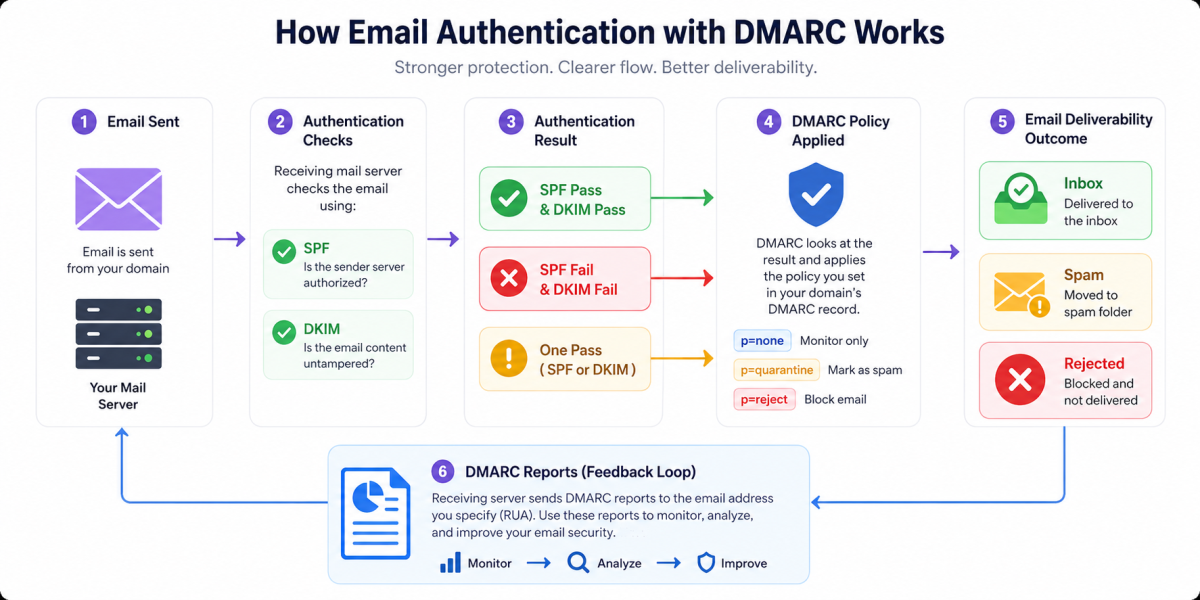
The Hole Email Authentication Fills
Open an SMTP session by hand and you can put any domain you like in the envelope and any name you like in the headers. The receiving server has no way, from the protocol alone, to tell a genuine invoice from your finance team apart from one a stranger typed on a rented VPS.
$ telnet mail.example-receiver.com 25
220 mail.example-receiver.com ESMTP

MAIL FROM:<anything@whatever.test>       ← envelope sender, unverified
RCPT TO:<victim@example-receiver.com>
DATA
From: "Finance" <billing@yourbank.com>   ← what the human sees, also unverified
Subject: Invoice 4471 overdue

Please pay the attached invoice today.
.
250 OK: queued
Two different sender identities appear in that session and neither was checked. Email authentication adds the missing checks in three layers, each published by the sending domain in DNS and each verified by the receiver:
- SPF answers "is this IP address allowed to send for this domain?"
- DKIM answers "was this message signed by a key this domain publishes, and is it unmodified?"
- DMARC answers "do either of those results belong to the domain in
From:, and if not, what should I do about it?"
That last question is the one that matters, because SPF and DKIM on their own authenticate domains nobody ever sees.
Three Identities Travel With Every Message
Before anything can be checked, you have to be clear about what is being checked. A single email carries three separate domain identities, and they are frequently three different domains even for perfectly legitimate mail.
| Identity | Where it lives | Who checks it | Visible to the reader? |
|---|---|---|---|
RFC5321.MailFrom | SMTP envelope, surfaced as Return-Path: | SPF | No |
d= signing domain | DKIM-Signature: header | DKIM | No |
RFC5322.From | From: header | DMARC | Yes |
When your newsletter goes out through a marketing platform, the envelope sender is usually a bounce address at the platform's own domain, the DKIM signature may be applied by the platform, and the From: header is yours. SPF and DKIM can both pass beautifully for the platform while the domain in front of the reader was never authenticated by anything.
A spammer can register a throwaway domain, publish a perfect SPF record and a valid DKIM key for it, pass both checks, and still put billing@yourbank.com in the From: header. DMARC is the rule that says the check must have been performed on the domain the reader sees.
What the Sending Domain Publishes
Everything a receiver needs is in your DNS. Three records, at three well-known locations:
; 1. SPF — which servers may send using this domain in the envelope
example.com.                    IN TXT "v=spf1 include:_spf.google.com ip4:203.0.113.10 -all"

; 2. DKIM — the public half of the signing key, under a selector
mail2026._domainkey.example.com. IN TXT "v=DKIM1; k=rsa; p=MIIBIjANBgkqhkiG9w0BAQEFA..."

; 3. DMARC — alignment requirements, policy, and where to send reports
_dmarc.example.com.             IN TXT "v=DMARC1; p=reject; rua=mailto:dmarc@example.com; adkim=r; aspf=r"
Note the shape of each lookup. SPF is a TXT record on the domain itself. DKIM is a TXT record on <selector>._domainkey.<domain>, where the selector is chosen by whoever signs the mail — which is why one domain can hold many DKIM keys at once, one per sending service. DMARC is a TXT record on the _dmarc subdomain, and there is exactly one per domain.
For the syntax of each record, see SPF Record Syntax, What Is DKIM? and the DMARC Tag Reference.
What the Sending Server Adds
SPF requires nothing from the sending server beyond the IP address it already has. DKIM does: before the message leaves, the signing server hashes the body, hashes a chosen list of headers, and signs the result with the private key matching the published selector. The output is a header attached to the message.
DKIM-Signature: v=1; a=rsa-sha256; c=relaxed/relaxed;
        d=example.com; s=mail2026; t=1756290000;
        h=from:to:subject:date:message-id;
        bh=2jmj7l5rSw0yVb/vlWAYkK/YBwk=;
        b=dzdVyOfAKCdLXdJOc9G2q8LoXSlEniSbav+yuU4zGeeruD00lszZ...
Only three of those tags matter for the journey we are following:
d=— the domain claiming the signature. This is the identity DKIM authenticates, and the one DMARC will later compare againstFrom:.s=— the selector, telling the receiver which key to fetch.h=— the headers covered by the signature. Anything listed here is frozen; change it in transit and the signature breaks.
From: is in the signed header list on virtually every real signature, and it has to be. If the From: header were not covered, an attacker could take a legitimately signed message, rewrite the visible sender, and the signature would still verify.
Step 1: The Receiver Checks SPF
The receiving server already knows two things before it reads a single header: the IP address that connected, and the envelope sender given in MAIL FROM. It takes the domain from the envelope sender, fetches that domain's SPF record, and evaluates the mechanisms in order until one matches the connecting IP.
Connecting IP:   203.0.113.10
MAIL FROM:       bounces@mail.example.com

  → TXT mail.example.com  =  "v=spf1 include:_spf.google.com ip4:203.0.113.10 -all"
  → ip4:203.0.113.10 matches the connecting IP

  SPF result: pass   (for the domain mail.example.com)
Two details trip people up. First, when the envelope sender is empty — which is normal for bounce messages — SPF falls back to checking the HELO hostname instead. Second, SPF evaluation is capped at ten DNS-querying mechanisms; exceed it and the result is permerror, which DMARC treats as a fail. Chained include: statements from several vendors hit that ceiling surprisingly quickly. SPF Validator counts the lookups for you.
Note what the result is attached to: mail.example.com, the envelope domain. Nobody reading the message will ever see that domain. Hold on to it — it comes back in step 3.
Step 2: The Receiver Verifies DKIM
Next the receiver reads the DKIM-Signature header, fetches the public key from s= and d=, recomputes the body hash and the header hash exactly as the signer did, and checks the signature.
DKIM-Signature: d=example.com; s=mail2026; h=from:to:subject:date:message-id; ...

  → TXT mail2026._domainkey.example.com  =  "v=DKIM1; k=rsa; p=MIIBIjANBgkq..."
  → recompute body hash          → matches bh=
  → recompute signed header hash → verifies against b=

  DKIM result: pass   (for the domain example.com)
A message can carry several DKIM signatures — the sending platform may add one for its own domain and another for yours. Each is verified independently, and DMARC only needs one of them to be both valid and aligned. Verification fails if the key is missing or revoked, if the signed headers were altered, or if so much as a byte of the body changed after signing.
Step 3: DMARC Finds the Policy
Now the receiver turns to the header the human will actually see. It extracts the domain from From: and looks for a DMARC record on that domain's _dmarc subdomain.
From: "Billing" <billing@example.com>

  → TXT _dmarc.example.com
     "v=DMARC1; p=reject; rua=mailto:dmarc@example.com; adkim=r; aspf=r"
If there is no record there, the receiver does not give up immediately. It walks up to the organizational domain — the registrable domain just below the public suffix — and looks for a record there instead. A message from news.marketing.example.com with no record of its own inherits the policy at _dmarc.example.com, and specifically the sp= tag if the parent published one for its subdomains.
A domain may publish exactly one record beginning v=DMARC1. Two records at _dmarc is not a merge — it is an error, and receivers treat the policy as absent. This catches people who add a second record for a new reporting vendor instead of adding a second mailto: to the existing rua=.
Step 4: Alignment Decides Whether the Passes Count
This is the step that makes DMARC more than a wrapper. The receiver now has up to two authenticated domains and one visible domain, and it compares them.
| Check | Domain it authenticated | From: domain | Relaxed | Strict |
|---|---|---|---|---|
| SPF | mail.example.com | example.com | Aligned | Not aligned |
| DKIM | example.com | example.com | Aligned | Aligned |
| SPF | sendgrid.net | example.com | Not aligned | Not aligned |
Relaxed alignment (the default, and what adkim=r / aspf=r request) requires only that the two domains share an organizational domain, so any subdomain of yours aligns with yours. Strict alignment requires an exact string match. Relaxed is the right default for almost everyone; strict matters when you have delegated subdomains you do not want speaking for the parent. DMARC Alignment Explained covers the edge cases in depth.
The verdict rule itself is short:
DMARC passes if:

    (SPF  = pass  AND  SPF-authenticated domain aligns with From:)
 OR (DKIM = pass  AND  DKIM d= domain          aligns with From:)

Otherwise DMARC fails.
One aligned pass is enough; the other check may fail outright and it does not matter. That redundancy is deliberate, because the two mechanisms break in different situations — which is exactly what the next section is about.
Step 5: The Policy Is Applied
Only when DMARC has failed does the p= tag come into play. A passing message is delivered normally; the policy is instructions for failure.
| Policy | What the receiver does | Use it when |
|---|---|---|
p=none | Nothing. Deliver as normal and send reports. | You are still discovering who sends as your domain. |
p=quarantine | Deliver to the spam or junk folder. | Reports are clean but you want a safety net. |
p=reject | Refuse the message at SMTP time, usually with a 550. | Every legitimate source is authenticated and aligned. |
Because p=reject is enforced during the SMTP conversation, the sending server gets a hard bounce rather than a silent disappearance — useful when the "attacker" turns out to be your own ticketing system. The DMARC policy guide covers pct=, which applies a policy to only a sampled percentage of failing mail, and sp= for subdomains.
DMARC policy is honoured by the major mailbox providers, but a receiver is free to ignore it, apply something stricter, or fold the result into its own reputation scoring. A DMARC pass is also not a delivery guarantee — an authenticated message from a domain with a bad sending reputation still lands in spam.
Reading the Verdict in the Headers
Every step above is written down. The receiving server stamps an Authentication-Results header onto the message recording what it found, and that header is the single most useful artefact when something goes wrong.
Authentication-Results: mx.example-receiver.com;
       spf=pass (sender IP is 203.0.113.10) smtp.mailfrom=mail.example.com;
       dkim=pass header.d=example.com header.s=mail2026;
       dmarc=pass (p=REJECT sp=NONE dis=NONE) header.from=example.com
Read it as three answers to three different questions:
smtp.mailfrom=is the domain SPF authenticated — the envelope, not the visible sender.header.d=is the domain DKIM authenticated.header.from=is the visible domain, anddmarc=is the only line that decided delivery.dis=records the disposition actually applied.
When you see spf=pass next to dmarc=fail, compare smtp.mailfrom with header.from — the answer is nearly always sitting right there. Paste a full header set into the Email Header Analyzer to have it broken down line by line.
Where the Chain Breaks in Real Life
Almost every DMARC failure on legitimate mail comes from one of a handful of situations, and knowing the shape of each saves a lot of report-reading.
| Situation | What breaks | Why | Fix |
|---|---|---|---|
| Message forwarded by an alias | SPF | The forwarder's IP was never in your SPF record. | Rely on DKIM; it survives forwarding intact. |
| Mailing list adds a footer or subject tag | DKIM | The signed body or header changed, breaking the hash. | The list should rewrite From: or seal with ARC. |
| New SaaS tool sends as your domain | Both | Its IPs are not in SPF and it has no DKIM key from you. | Add its include: and publish its DKIM selector. |
| Vendor signs with its own domain | Alignment | DKIM passes for the vendor, not for From:. | Set up a signing key under your own domain with the vendor. |
| SPF record exceeds ten lookups | SPF | permerror, which counts as a failure. | Flatten or consolidate include: chains. |
| Subdomain sends with no record | Policy | It inherits sp=, which may be stricter than expected. | Publish an explicit record for the subdomain. |
Forwarding deserves a note of its own, because it is the reason the whole either/or structure exists. SPF is a check on the connection, so it cannot survive a hop it does not know about. DKIM is a check on the content, so it survives any number of hops as long as the content is untouched. Between them they cover most real routing — and where neither survives, ARC (Authenticated Received Chain) lets an intermediary vouch for the results it saw before it modified the message, so a downstream receiver can choose to trust that chain.
Reports Close the Loop
Everything so far happens on the receiver's side, invisibly. The rua= tag is what gives you visibility back: receivers batch up what they saw and send you an XML summary, typically once a day.
<record>
  <row>
    <source_ip>198.51.100.44</source_ip>
    <count>318</count>
    <policy_evaluated>
      <disposition>none</disposition>
      <dkim>fail</dkim>
      <spf>fail</spf>
    </policy_evaluated>
  </row>
  <identifiers>
    <header_from>example.com</header_from>
  </identifiers>
</record>
That block says 318 messages claiming to be from example.com came from an IP address that authenticated as nothing at all, and that the current p=none policy let them through. Is it an attacker, or the billing system nobody remembered to configure? The report will not tell you — that is the work of the p=none phase, and the reason to stay in it until the answer is always "a source I recognise, and it now passes".
Aggregate reports contain no message content and no recipient addresses, only counts by source and result. Forensic reports (ruf=) do contain message data, which is why almost no major provider sends them any more — see RUA vs RUF. To read incoming XML without hand-parsing it, the DMARC Report Analyzer turns a report into a per-source table.
Rolling It Out Without Losing Mail
The sequence below is the one that works, and the only genuinely risky move in it is the last one.
- Inventory your senders. Marketing platform, helpdesk, CRM, billing, monitoring, the CI server that emails build failures. Everything that puts your domain in
From:. - Publish SPF and DKIM for each one. Prefer a DKIM key under your own domain over the vendor's default signing domain — that is what makes the pass align.
- Publish
p=nonewithrua=. Nothing changes for delivery. Reports start arriving the next day. - Read reports for two to four weeks. Chase every unrecognised source until each one either shows an aligned pass or is confirmed as illegitimate.
- Move to
p=quarantine. Optionally withpct=to ramp. Watch reports and your support queue for a couple of weeks. - Move to
p=reject. Now exact-domain spoofing of your brand stops working at the major providers.
The DMARC Record Generator will build the record for each stage, and every input it asks for is documented field by field.
An enforced policy is a prerequisite for BIMI, which displays your logo beside authenticated messages in supporting clients. It also pairs naturally with MTA-STS, which protects the transport rather than the identity — DMARC proves who sent the message, MTA-STS makes sure it travelled encrypted.
What DMARC Does Not Do
Being precise about the limits keeps expectations honest. DMARC authenticates the domain in the From: header and nothing else:
- It does not check the display name. "Your Bank Security" sent from a Gmail account is fully authenticated — for Gmail.
- It does not stop lookalike domains.
yourbank-secure.comis somebody else's domain with its own policy, and it does not violate yours. - It does not encrypt anything. That is TLS, MTA-STS and DANE.
- It does not filter spam. A perfectly authenticated message can still be unwanted, and receivers judge that separately.
Summary
Email authentication works because the sending domain publishes its rules in DNS and the receiving server enforces them at delivery time. SPF authorises the connecting IP against the envelope sender. DKIM proves the message was signed by a key the domain published and has not been altered. Neither of those, on its own, says anything about the address the reader sees — and that is the address attackers care about.
DMARC is the joining rule. It requires that at least one of those checks passed for a domain aligned with the visible From:, and it gives the sender a way to say what should happen when neither did. Add reporting and the whole thing becomes observable: you can see who sends as you, fix the legitimate sources, and then close the door on everyone else. The order matters — authenticate first, watch second, enforce third.
Frequently Asked Questions
1. What is email authentication?
Email authentication is the set of DNS-published checks a receiving mail server runs to decide whether a message really came from the domain in its From: address. SMTP itself has no such check — any server can claim to be any domain. SPF authorises sending IP addresses, DKIM adds a cryptographic signature, and DMARC ties either of those results back to the visible From: domain and tells receivers what to do when neither matches.
2. How does DMARC actually work with SPF and DKIM?
DMARC does not run its own check on the message. It reads the SPF and DKIM results the receiver already produced, compares the domain each of them authenticated against the domain in the From: header, and requires at least one to both pass and match. That match is called alignment. If SPF passes for a domain nobody sees and DKIM was never applied, DMARC still fails — passing a check is not the same as passing DMARC.
3. Does DMARC need both SPF and DKIM to pass?
No. One aligned pass is enough. A message that fails SPF because it was forwarded still passes DMARC if its DKIM signature survived and the signing domain aligns with From:, and the reverse is also true. In practice you want both configured anyway, because each one fails in situations the other survives — SPF breaks on forwarding, DKIM breaks when a mailing list rewrites the body.
4. What does the Authentication-Results header tell me?
It is the receiver writing down its own verdict. A typical line records spf=pass with the envelope domain it checked, dkim=pass with the d= signing domain, and dmarc=pass with the policy it found. Read it from the right: the DMARC line is the only one that decided delivery, and the domains quoted on the SPF and DKIM lines are what tell you whether alignment held. Email Header Analyzer parses the header for you.
5. Why does my email fail DMARC after being forwarded?
Forwarding replaces the sending IP address with the forwarder’s, so the receiving server checks SPF against a host your record never authorised and gets a fail. DKIM normally survives forwarding untouched, which is exactly why DMARC accepts either signal. If a forwarded message fails DMARC, it almost always means DKIM was missing, the signature was broken by a content change, or the signing domain did not align with From:.
6. Does DMARC stop someone spoofing my brand name?
Only when they use your domain. DMARC authenticates the domain part of the From: address and nothing else. An attacker who sends from security-yourbank.com, or who puts "Your Bank Support" in the display name of a Gmail address, is not violating your policy at all — the message is authentic for the domain it actually used. DMARC closes exact-domain spoofing; lookalike domains need brand monitoring instead.
7. What happens if I have no DMARC record at all?
The receiver runs SPF and DKIM as usual but has no instruction to act on the result, so a failing message is judged on spam heuristics alone and often lands in the inbox anyway. You also get no reports, so you cannot see who is sending as your domain. Large mailbox providers increasingly require at least p=none for bulk senders, so "no record" is no longer a neutral position.
8. How long does it take for a DMARC change to take effect?
The DNS side is fast — receivers cache the _dmarc TXT record for its TTL, so a change is visible within minutes to a few hours. The reporting side is slow: aggregate reports cover a 24-hour window and arrive the following day, so it takes roughly a week of data before you can judge whether a policy change was safe. Tighten policy on report evidence, never on the DNS timing.
9. Should I start with p=reject?
No. Start at p=none, which changes nothing about delivery and only turns on reporting. Spend a few weeks reading aggregate reports until every legitimate sending source shows an aligned pass, then move to p=quarantine, then to p=reject. Jumping straight to reject on a domain whose sending sources you have not inventoried is the reliable way to silently lose invoices, ticket notifications and password resets.